


Post toInstagram

A little sunshine for your feed.
Professional accounts you connectSocial media, made easier.
No card · 300 destination publishes during your trial
Then $9.99/month for publishing · $11.99 with comments & messages
The real Social Fanout interface shows a sample draft, image URL, selected accounts and schedule. The ending illustrates that same post fanning out to Bluesky and Threads—it is an illustrative preview, not a real send. No posts are sent. Media support varies by destination.
One idea. Every connection.
DEMO POSTS · NOT PUBLISHEDA little sunshine for your feed.
Professional accounts you connectA fresh idea for your community.
Pages you are authorized to manageWhat are you making this week?
Eligible connected accounts
A different view for your feed.
Eligible connected accountsFresh perspectives start outside the usual routine.
Eligible member profilesSmall ideas. Shared widely.
Text allowance · links use Link Packs
Make a little room for motion.
Eligible accounts · privacy/disclosure reviewA new angle on your next video.
Limited/testing · not general availabilityA weekend project worth sharing.
Community rules and account eligibility applyShare something with your community.
Authorized channels onlySave a little inspiration for later.
Public Boards you choose · publishes immediatelyAn idea for your organization.
Existing approved access onlyOriginal demo artwork, not customer posts. Account permissions and provider limits apply. See availability.
Meet the maker
How Social Fanout came to be, and how to use it with your apps and AI tools.
37 seconds · English captions available
From idea to the accounts you choose
Create your post, add an image or video URL, and choose when it goes out. Connect the accounts you want to publish to. No copying the same post into every app.
Choose “Schedule for later” and set a date and time. Social Fanout handles the send to supported destinations. You can also publish immediately.
Set up your connectionsChoose a network first. Sign in for your free trial when you connect—no card required.
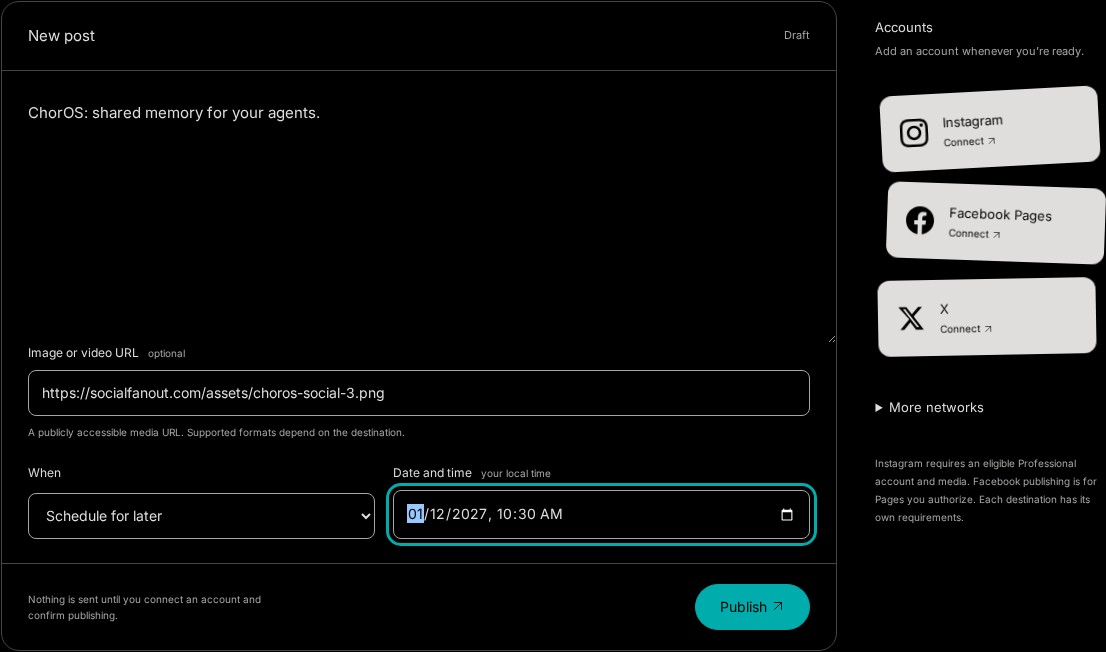
Illustrative workflow with original demo artwork—not a live AI conversation or a completed send.
Publishing infrastructure for the AI you already use.
Add your words and an image or video URL.
Publish now, or pick a date and time for later.
Choose eligible accounts, then confirm your post.
Publishing is only the start
Read comments. Reply to your audience.
Respond to customer-initiated messages.
Pro · $11.99 / month
Messages: text replies within 24 hours. Connect each feature separately. No automatic replies or cold outreach.
Explore ProFor your AI tools and your software
Let Claude or another compatible AI tool create and send posts through MCP. Building an app? Use our REST API to add social publishing without building each supported platform integration yourself.
Your users connect their own eligible accounts. Your software can send content, schedule supported posts and check job status. The same publishing tools work in the dashboard, too.
Build your first integrationSocial posting for Claude and AI agents
ChatGPT uses a private GPT Action where Actions are available; the current ChatGPT Action excludes LinkedIn publishing. Directory availability remains subject to provider review.
Every plan includes the REST API, hosted OAuth MCP, and local MCP.
Use the AI tools you already work with. Builder includes dashboard publishing, scheduling, REST API and MCP. Pro adds supported Facebook Pages and Instagram Professional comments and messages.
Different tools, different limits: Postiz also includes a visual calendar, analytics and media editing. Check Social Fanout’s destination availability and the features you need before switching.
X includes 100 text-only posts per key per UTC month. Linked X posts use separate $10 Link Packs for 40 credits; normal plan limits still apply. AI-tool subscriptions are separate. Monthly base prices checked November 1, 2026 against Postiz’s official pricing.
Try your workflow free for 7 daysNo card · 300 destination publishes during your trial · Connect only accounts you choose.
Publishing, comments, and messages have separate access requirements. Check the table for supported accounts and any current limits.
| Platform | Publishing | Comments & replies | Messages |
|---|---|---|---|
| X / Twitter | Available | Not integrated | Not integrated |
| LinkedIn members | AvailableEligible member profiles. | Not integrated | Not integrated |
| LinkedIn Pages | Administered PagesPublish to Pages you administer. Broader customer Page access is not yet generally available; LinkedIn Standard Tier approval is required. | Not integrated | Not integrated |
| TikTok | AvailableContent Posting approved. | Waiting on TikTokTikTok must approve comments access before SocialFanout can verify eligible-account comments and replies. | Not integrated |
| Facebook Pages | AvailablePage publishing approved. | AvailableEligible authorized Pages; receive comments and send explicit public replies. No automatic replies; dashboard replies require a human click. | AvailableEligible authorized Pages; customer-initiated conversations and explicit text-only replies within 24 hours. |
| AvailableImage and Reel publishing approved. | AvailableEligible Professional accounts; separate authorization. Explicit replies, hide/unhide, and delete app-created replies. | AvailableEligible Professional accounts; separate authorization. Customer-initiated, text-only replies within 24 hours. | |
| Threads | AvailableText and image publishing approved. | Not integrated | Not integrated |
| AvailableImage Pins to public Boards you choose, with an optional title and destination link. Pins publish immediately; scheduling is not available. | No public API | No public API | |
| YouTube | Limited · SocialFanout + GoogleGoogle/YouTube review and SocialFanout live upload verification must finish before uploads open broadly. | Not integrated | No public API |
| Bluesky | Available | Not integrated | Not integrated |
| Available | Not integrated | Not integrated | |
| Discord | Available | Not integrated | Not integrated |
| Available | Not applicable | Not integrated |
Connect to use: authorize each destination through its supported setup. Most use OAuth; Bluesky uses an app password. Comments and messages may need separate authorization.
Connection maintenance: provider credentials stay server-side and refresh only where supported. LinkedIn member connections normally need reconnecting about every 60 days when LinkedIn does not issue refresh access.
Available means the publishing connector is open for an eligible connected account. Comments and messages have separate availability and account requirements.
Available — working for eligible connected accounts. Limited — the restrictions beside the platform apply. Waiting on TikTok — awaiting provider approval. Not integrated — we have not implemented this feature. No public API — the network's current public API does not provide this feature. Not applicable — this destination has no post-comment surface.
Most destinations use an OAuth redirect. Bluesky requires an app password, entered in Social Fanout’s connection setup. Provider credentials stay server-side; your publishing app or agent uses only the Social Fanout API key. Treat that key as a publishing credential.
Review the content, accounts, and timing before submitting a publish or schedule request. Created jobs retain their status and provider receipts when available. An accepted or unclear result is not proof that a post is live; inspect the receipt and destination.
Publishing is currently available for eligible connected accounts on Instagram, Threads, Facebook Pages, LinkedIn member profiles, TikTok, X, Pinterest, Reddit, Bluesky, Discord, and Email. Instagram uses standalone Business Login for eligible Professional accounts; Threads text and image publishing is live for eligible connected accounts. Meta has approved and Published the dedicated Facebook Comments and Facebook Messenger apps. Both are available to eligible Page admins after separate per-Page authorization. Comments replies are sent only on an explicit request; Social Fanout never replies on its own, and the dashboard requires a human click. Messenger supports only explicit text replies in customer-initiated conversations inside the standard 24-hour window, with no cold outreach, automation, media replies, or Human Agent. Instagram Comments and Instagram Messages are available for eligible Professional accounts after separate authorization for each. Comments supports explicit replies, hide/unhide, and deletion of app-created replies. Messages supports customer-initiated, text-only replies inside 24 hours; automatic replies and media replies are not offered. Comments and replies on TikTok are waiting on TikTok approval. SocialFanout must then verify eligible-account comments and replies before this lane opens. Pinterest publishing is available: each Pin needs one image and a public Board you choose, and can carry a title and a destination link. Pins publish immediately; scheduling is not available. YouTube remains Limited until Google/YouTube review and SocialFanout live upload verification finish. The dashboard shows conservative provider-level readiness; each account's scopes still need a live connection check. LinkedIn member publishing is available for eligible connected profiles, with periodic reconnect when LinkedIn does not issue refresh access. LinkedIn Page publishing works for Pages administered by the connected member under Development Tier, and refreshable Page connections renew on publish; Standard Tier review is pending for unrestricted customer Page access. LinkedIn uses the dashboard, REST API, or local MCP; the current ChatGPT Action excludes it.
Both, on the same key and the same logs. Call /v1/publish
from your app, or wire the local MCP server into agent clients.
The managed production service publishes fresh checks at
/status. Running it on your own
infrastructure, source access, and white-label or resale terms
require a separate written agreement; the source repository is
not public.
Each destination counts separately when its provider accepts the publish request. Dry runs, scheduling alone, and requests rejected before provider acceptance do not use your allowance. An accepted request still counts if delivery fails later; acceptance does not prove a post is live. Check unclear outcomes before retrying. Plans cap monthly destination publishes; the 7-day trial allows up to 300 in total. If Facebook and Instagram each accept the same update, that counts as two publishes.
New providers, approval milestones, AI-agent examples, and early customer notes. The list for people building on socialfanout.com as the surface expands.
Find your fit
See it in the wild
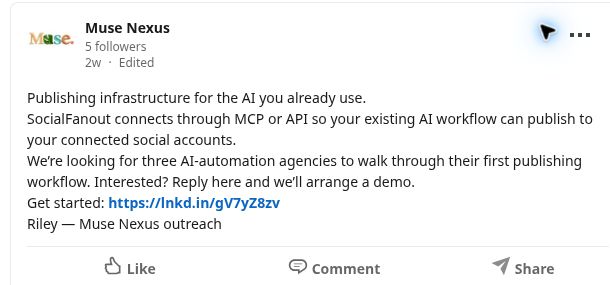
Muse Nexus uses Social Fanout for its own publishing. Here is one actual LinkedIn post—not a customer testimonial or a simulated result.
View the published postReady when you are

